快速部署静态瓦片地图服务(leaflet支持)
简述
leaflet支持类似
https://ip:port/{z}/{x}/{y}.png
的地图源,这种源本质上就是一个能按路径返回http文件的http文件服务器,可以直接使用静态文件服务器(如nginx)进行部署。
获取地图瓦片
要获取地图瓦片,最简单的方式是借助开源的MapDownload下载器
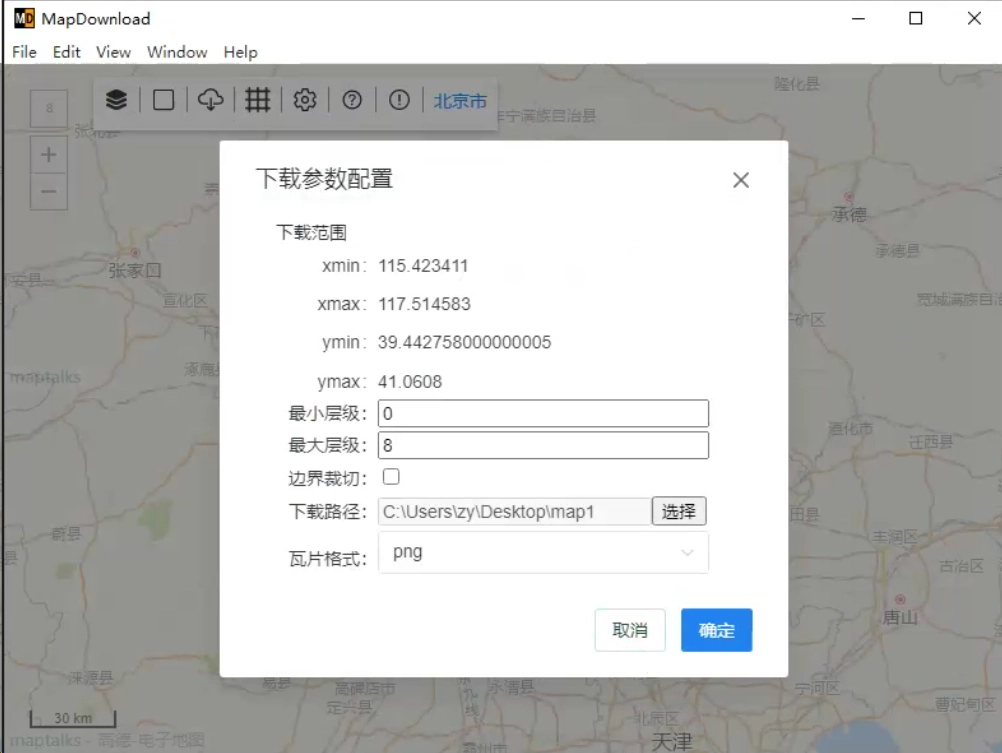
下载后得到的是地图瓦片文件,遵循{z}/{x}/{y}.png的命名格式,接下来是直接使用http服务器(这里选择nginx)对外暴露为地图源
然后把下载的整个地图瓦片打包传输到服务器上的一个目录
这里使用的是docker的方式部署nginx
目录结构:
1 | . |
docker-compose.yml
1 | services: |
nginx.conf
1 | events {} |
index.html
1 | <!DOCTYPE html> |
docker compose up -d
如果没有报错的话,地图瓦片就部署成功了,访问https://ip:port/index.html就能查看部署的地图,
地图源格式为https://ip:port/{z}/{x}/{y}.png
本博客所有文章除特别声明外,均采用 CC BY-NC-SA 4.0 许可协议。转载请注明来源 灌木の小破站!
相关推荐

2024-01-28
Debian无法使用sudo获取root权限解决办法
某天安装debian最新版本发现sudo apt、sudo -i用不了, user@debian:~$ sudo apt update [sudo] user 的密码: user 不是 sudoers 文件。 原因: 高版本不会默认把新建的账户加入sudoers文件中,所以无法使用 sudo 命令来获得超级用户权限。 解决办法1: su - root 使用这条可以直接登录root账户 解决办法2: 使用下面这条指令编辑sudoers文件 visudo 然后找到root ALL=(ALL:ALL) ALL这一行,在这一行下面添加 user ALL=(ALL:ALL) ALL 注意:请把user换成自己的用户名 然后Ctrl+X退出,再按Y保存,按Enter确认

2025-09-16
Portainer 反向代理后无法登录,显示 Unable to login
Portainer 从 2.27.7 版本开始,经过反向代理访问时无法登录,报错 “Unable to login” 。 Portainer 后端报错: portainer | 2025/09/16 07:34AM ERR github.com/portainer/portainer/api/http/csrf/csrf.go:100 > Failed to validate Origin or Referer | error="origin invalid" forwarded= host=xxx.xxxx.xxx origin=https://xxx.xxx.xxx referer=https://xxx.xxx.xxx/ request_url=/api/auth trusted_origins=["xxx.xxx.xxx"] x_forwarded_proto= 原因:2.27.7版本升级了 gorilla/csrf 这个第三方库,变得更严格地要求 Origin 和 Referer 头。 为了解决这个问题,Port...

2026-03-27
OpenVPN 服务端搭建,以及实现简单账号密码验证
最近顺手把一台机器上的 OpenVPN 重新整理了一遍,顺便把过程记下来,免得下次再搭的时候又去翻零散笔记。 大概流程是使用 Easy-RSA 管理证书,部署 OpenVPN 服务端,再生成客户端配置文件完成连接。如果只是想先把服务跑起来,这套流程已经够用了。 本文系统环境为 Ubuntu 20.04 Server 版本 安装 OpenVPN 和 Easy-RSA先把需要的软件装上: 1apt install openvpn easy-rsa -y 创建 PKI 证书体系先初始化一套 PKI 证书体系,用来后续签发服务端和客户端证书: 123make-cadir ~/easy-rsacd ~/easy-rsa./easyrsa init-pki 创建 CACA 是后续签发证书的核心。执行下面的命令: 1./easyrsa build-ca 执行过程中会提示: 输入证书密码 输入 CA 名称 如果 CA 名称直接回车不填,默认会使用 Easy-RSA CA。 生成服务端证书和密钥先生成服务端请求和私钥: 1./easyrsa gen-req server nopass ...

2025-07-06
接入腾讯EdgeOne CDN报告
2025/11/20编辑:宣布本文作废,现在Edgeone的海外节点在国内的范围体验还不如Cloudflare,现在换回cf了 听群友说腾讯的EdgeOne CDN国际版已经开始公测了,而且还有免费的国际节点套餐,钱包空空的站长也是立马去嫖了一个免费版兑换码,并接入本站。 本站EdgeOne CDN加速地址:https://www.12520.net/ 接入过程和其他cdn一样,动动手指就能接入 edgeone节点在国内访问的质量参差不齐,近期也有不少人开始对edgeone的ip节点进行优选,其中,edgeone貌似给了回源ip段,里面有不少ip是能直接使用的,也有不少ip报http代码418,具体需要自己携带host头发起http请求测试。(7月4日和7月6日使用itdog.cn的网站测速来对edgeone进行测试出现全红的情况,可能是edgeone有意屏蔽了来自itdog的测试节点ip) edgeone公开的回源ip段:https://api.edgeone.ai/ips 其中一个测试方法是使用curl指定域名解析ip测试 curl --resolve w...

2026-01-06
zabbix7.0和代理proxy端的部署和配置详解(docker)
一般选择使用docker部署,简单不易出错, 安装zabbix服务端在文件夹下创建docker-compose.yaml,然后docker compose up -d(环境变量的数据库密码要一致) services: # 数据库,用mariadb或者mysql都行 mariadb-server: image: mariadb:10.11 container_name: mariadb-server command: - --character-set-server=utf8mb4 - --collation-server=utf8mb4_bin - --innodb_rollback_on_timeout=OFF - --innodb_lock_wait_timeout=30 volumes: - ./db_data:/var/lib/mysql environment: - MARIADB_USER=zabbix - MARIADB_PASSWO...

2023-12-14
NAT回环问题(内网设备无法通过公网ip访问自身服务)
众所周知,当一个tcp/ip服务使用nat映射出公网的时候,在同一内网的设备无法通过公网ip访问这个服务 whq12520于某天安装mcsm面板,使用nginx反代ssl的时候遇到这个问题,就打算浅浅研究一下 举个例子,存在一个192.168.1.0/24的内网(192.168.1.xxx),NAT网关为192.168.1.1,网关对外公网ip为100.128.1.1的网络。 其中,192.168.1.2(server1)使用80端口对外开放了一个http服务,网关同时设定了端口映射规则10.128.1.1:80->192.168.1.2:80。这个规则意味着所有目标地址为10.128.1.1:80的数据包在经过网关时,目标地址会被网关替换成192.168.1.2:80,源地址不变。 一个正常的tcp握手请求如图所示 这时,tcp握手数据包正常到达server1,然后server回应请求也会经过网关NAT地址转换,如图所示 这时,tcp握手正常进行 如果一个在内网的pc1访问10.128.1.1:80的http服务,就会遇到nat回环的问题,tcp...
评论